
Get more out of Exact with Synergy AI: what an AI agent inside Synergy actually does for you
Do you work in Exact Synergy daily? Then you know exactly how much time processing documents, requests and other manual actions takes. Opening files, retyping information, reading through contracts, categorising mails, creating requests, linking tothe right relation or project. These are the tasks your Synergy users spend alarge part of their day on.
That can be a lot more efficient. Not by making your people work harder, andnot by implementing a new system. But by letting an AI agent work directly inside your Synergy environment.
What an AI agent in Synergy actually does
Select a few documents, requests, relations or projects. Open the chat. Give a command in plain text. That's the entire operation.
The agent understands what you've selected, analyses the content, compares where needed, and executes actions in your processes. No new interface to learn, no export-import, no data migration.
It all happens inside Synergy, based on the data that's already there.
Concretely, an AI agent in Synergy can: understand what you select — whether it's visit reports, contracts, requests or project documents.
Analyse and summarise — a stack of visit reports reduced to key points, a set of contracts compared for deviations.
Check and compare — placing agreements against reality, signalling deviations.
And execute actions in processes — creating new requests, drafting documents, scheduling follow-ups. All from your chat.
Three steps, nothing more
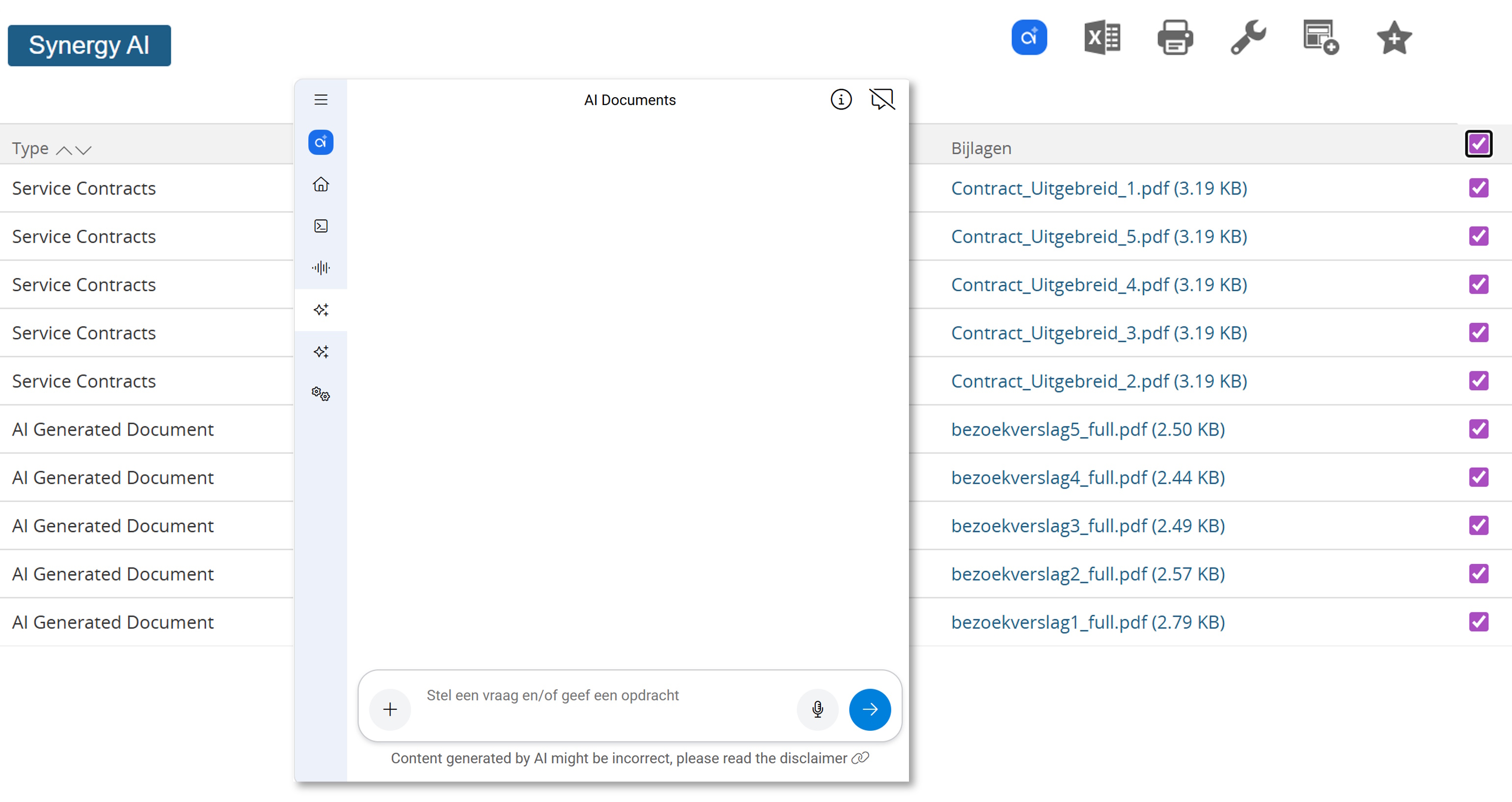
The workflow for a Synergy user is deliberately kept simple:
1. Select your data in Synergy. Documents, requests, relations or projects - exactly as you normally would.
2. Choose the Synergy AI icon and pick the assistant - agent you want to deploy. Each for its own task.
3. Chat and give a command for actions. Type or speak what you need. The agent does the rest.
There's no instruction manual. No training needed. If you can use Synergy, you can operate the agent.
Practical use cases for Synergy users
- For account management. Select five visit reports from a major customer and ask: "What are the key open actions from these reports, and which aren't yet inSynergy?" The agent summarises, identifies what hasn't been recorded as an action yet, and prepares the missing actions for creation.
- For contract management. Select a series of service contracts and ask: "Which contracts deviate from our standard terms, and what are the main risk points?" The agent analyses, compares, and delivers an overview with deviations per contract, plus a draft mail to legal.
- For project leaders. Select all documents around a running project and ask: "Give me a status overview based on these documents, and which decisions haven't been recorded yet. "The agent reads, correlates and delivers a project summary with open decisions.
- For back office and directors. Speak in: "Create a request for next week's meeting, base the agenda on unfinished actions from the last meeting." The agent generates the request, retrieves the unfinished points, and prepares everything in Synergy.
- For finance. Select incoming mail correspondence around invoices and ask: "Categorise these, link to the right projects, and draft responses where needed." The agent categorises, matches, drafts.
- For HR. Select incoming CVs and vacancy descriptions, ask: "Match these candidates to the vacancy profile and do an initial screening." The agent does the pre-selection — the decision stays with HR.
The three roles in AI within Synergy
There's an elegant division of roles in how this works. You pick the data — because you know your customer, your project and your context. The AI does the analysis — because that's what a language model is good at. Synergy executes it — because that's your system of administration, that's where the registration belongs.
That's also why this works where purely generic AI solutions fail. The AI isn't an external tool you have to copy data to. The AI works in the place where your work happens, with the rights your user already has, in the system where the audit trail already belongs.
What this changes for your organisation
For directors and managers of organisations using Exact Synergy, the question is no longer" should we do something with AI?" — that answer is clear by now.
The question is: where in our Synergy usage sits the biggest source of repetitive manual work, and which of those tasks would we want an agent to prepare forus?
Our experience is that it's rarely the one big bottleneck.
It's far more often a sum of many small ones: the dozens of contracts checked every month,the hundreds of mails that need classification, the reports that need summarising for the board.
Each one is ten minutes on its own, together a full working week per month. That's where the gain sits.
Where to start
Pick one type of task your team spends a lot of time on. Summarising visit reports. Comparing contracts. Categorising mail correspondence.
One task, not ten. Let three people from that team work with the agent for two weeks, and ask them: where did it help you, and where not?
What works spreads itself. What doesn't work, you'll hear soon enough. That's also why we don't offer this as a big transformation programme, but as a tool you add to your existing Synergy environment.
Do your people work in Synergy daily? Then there's probably more time tied upthere than you suspect. And more time to free up than you think.